
AI reserved capacity vs pay as you go is a choice between committed model-processing capacity billed at a fixed rate for a term, whether you use it or not, and per-token billing with no term. The utilization break-even is the usage level at which the two cost the same in a given month.
You are deciding how much of your inference spend to lock into a commitment. The answer depends on utilization, not on the headline discount.
A commitment turns a variable cost into fixed cash exposure. That changes your runway, your gross margin, and what the board needs to approve.
Providers also use "reserved" to mean different things. Some guarantee capacity, and some do not.
Every Fiscallion client works directly with Aleksandar Stojanovic at the CFO layer, so the model below is the one he would build and pressure-test with you before a commitment is signed.
Key takeaways
- The break-even utilization equals 100% minus the commitment discount. A deeper discount lowers the bar, but you still have to clear it.
- Commit the stable baseline of your usage. Leave bursts, experiments, and dev/test on pay-as-you-go.
- "Reserved" does not mean "guaranteed capacity" on every platform. Read the capacity language before you read the price.
- Finance should own the cash-timing model and the approval path, not just engineering.
The four purchasing mechanisms behave differently
You are not choosing between two options. You are choosing between several contract structures that share a name. The table below summarizes the official terms for the four mechanisms most SaaS teams encounter.
| Provider mechanism | What you buy | Billing basis | Term | Capacity language |
|---|---|---|---|---|
| AWS Bedrock Provisioned Throughput | Model units | Fixed hourly cost | No commitment, 1 month, or 6 months | Billing continues until you delete it, and you cannot delete it before the term ends |
| AWS Bedrock Reserved tier | Prioritized compute capacity | Fixed price per 1K tokens per minute, billed monthly | 1 or 3 months | Guaranteed within the purchased capacity; overflow goes to Standard tier |
| Azure Foundry PTUs and reservations | Provisioned Throughput Units | Hourly per PTU deployed, or reserved | Hourly, or 1-month or 1-year reservation | Reservations do not guarantee capacity availability |
| Vertex AI Provisioned Throughput | Fixed-term throughput subscription | Fixed cost per term | Several term lengths | Enabled subject to available capacity; overage billed pay-as-you-go |
| OpenAI Reserved Tier | Dollars-per-minute capacity for a specific model | Pre-purchased, burned down at list prices | Contract term for Enterprise customers | Other traffic is rejected before Reserved Tier traffic at peak load |
OpenAI's Fast mode (renamed from Priority on 2026-07-30) is a different animal. It is premium per-token pricing on a pay-as-you-go basis, with no advance provisioning. It buys faster processing, not a commitment.
Do not conflate AWS's two mechanisms. Provisioned Throughput is hourly per model unit. Reserved tier is a monthly fee per 1K tokens per minute.
How to calculate the utilization break-even
Start with one rule: committed cost is incurred regardless of usage. Azure states that you are billed hourly for deployed PTUs rather than for tokens consumed, and that this holds whether or not the deployment handles requests.
That gives you the formula:
- Break-even utilization (U*) = 1 - D, where D is the commitment discount versus the pay-as-you-go equivalent.
- Below U*, the commitment costs more than pay-as-you-go. Above U*, it costs less.
Worked example using verified Bedrock rates
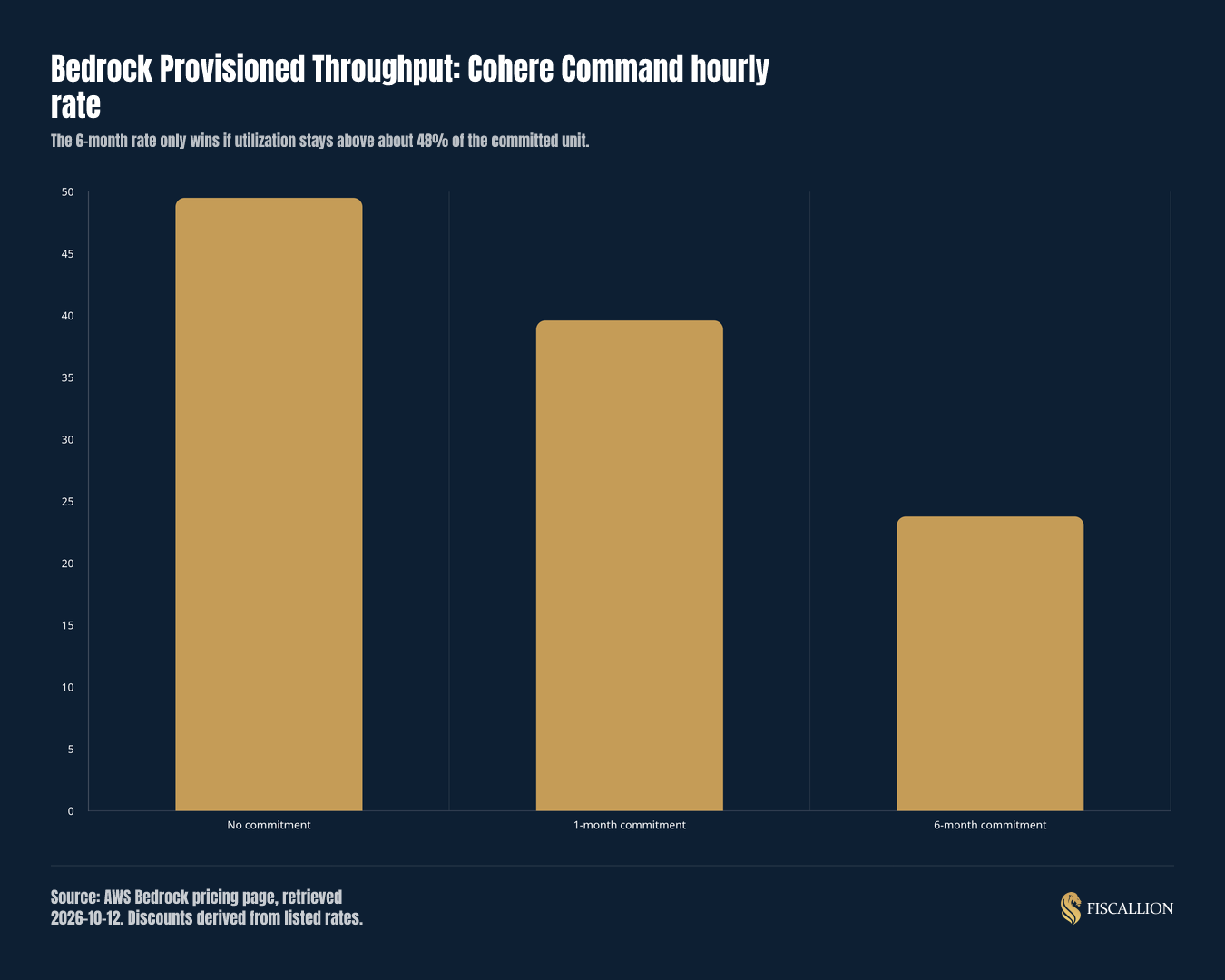
The AWS Bedrock pricing page lists Cohere Command Provisioned Throughput per model unit per hour. The rates and the discounts derived from them are below.
| Commitment | Rate (USD per hour per model unit) | Implied discount | Break-even utilization |
|---|---|---|---|
| No commitment | $49.50 | 0% | Not applicable |
| 1 month | $39.60 | 20% | 80% |
| 6 months | $23.77 | About 52% | About 48% |
The discount and break-even columns are arithmetic from the listed rates, not AWS-published figures.
Assumption: the pay-as-you-go equivalent cost scales linearly with the share of a model unit you would actually use. Real on-demand billing is per token, so confirm what a model unit processes for your workload before relying on this.
Under that assumption, a six-month commitment costs $23.77 per hour at any utilization. If your workload would use 30% of a unit, the equivalent cost is about $14.85 per hour, so you overpay. At 60%, it is about $29.70, so you save.
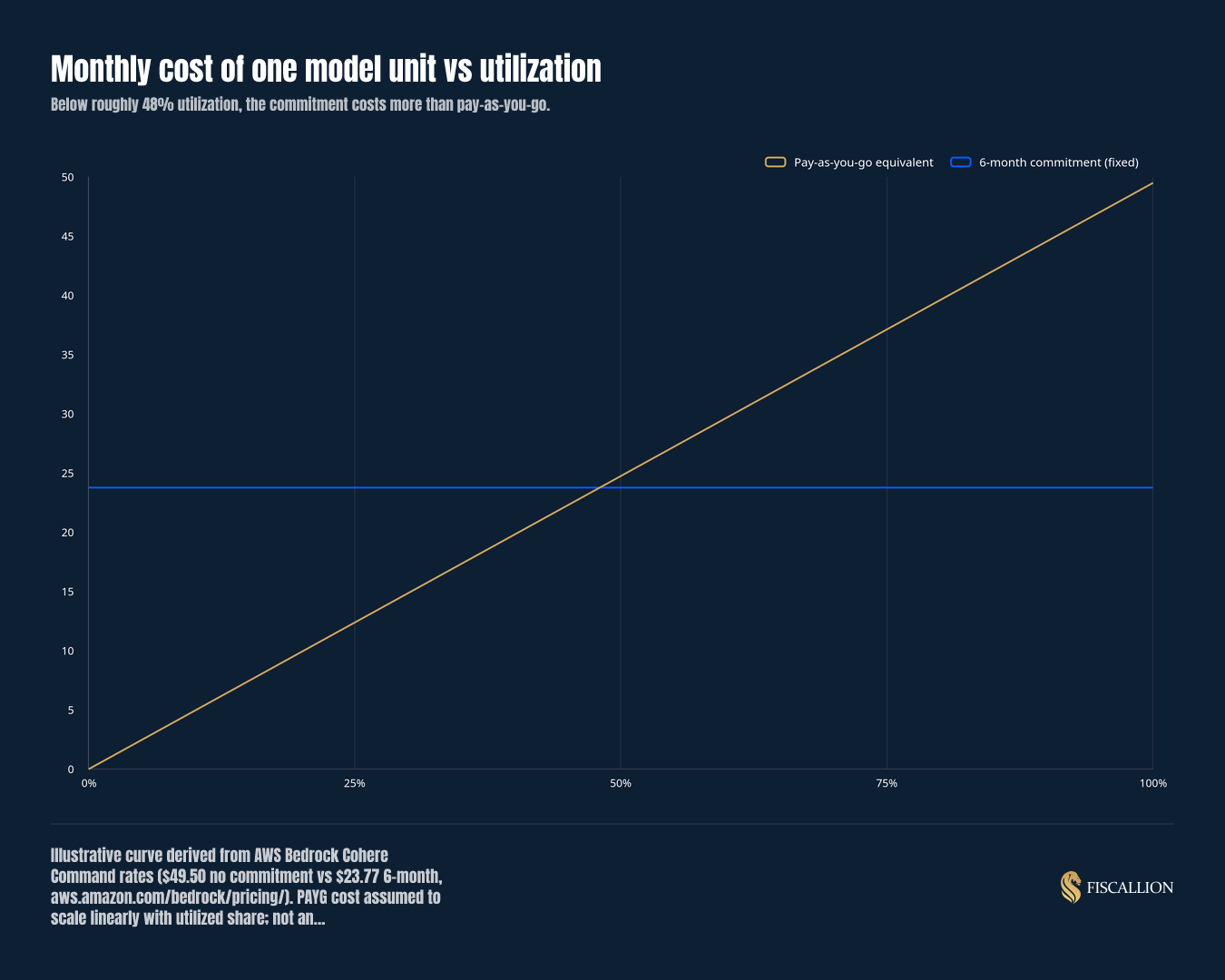
Note the cash side. Assuming 730 hours per month (an assumption, not a provider figure), the six-month rate is about $17,350 per month per unit, or roughly $104,100 over the term. That is the amount you owe even if usage falls to zero, because you cannot delete the throughput until the term ends.
Apply the same formula to spend-based commitments
Google's Flexible Savings Plans are spend-based. A 1-year term carries a 10% discount and a 3-year term carries 20%. You pay the agreed monthly amount for the duration, and unused commitment is still charged in full.
Applying the same formula, the break-evens are 90% and 80% of the committed amount, if the commitment is sized in discounted dollars. Confirm that denomination in the contract. Vertex Provisioned Throughput SKUs do not receive an incremental discount from these plans because they are already committed SKUs.
AWS's own guidance points the same direction. Its capacity guidance cites 30-50% savings with commitment on the Reserved tier. Using the formula, that implies break-evens between 50% and 70%. AWS suggests moving to Reserved tier when consistent load exceeds 40% of on-demand costs.
What the break-even tells you, and what it does not
"The break-even is a floor, not a recommendation. A commitment that clears the floor on average can still hurt you if usage is volatile."
— Aleksandar Stojanovic, CEO & Founder at FiscallionInterpret it against five inputs.
Utilization stability decides how much to commit
Measure trailing utilization by week, not by month. A stable baseline can be committed. A spiky profile should be mostly pay-as-you-go.
The rule is to commit the floor, not the peak. Size the commitment to the lowest sustained level in your downside scenario, and let the burst traffic fall to pay-as-you-go. Both AWS and Google bill overage above the purchased amount at standard rates, so overflow is covered.
Minimum spend and unit size set the granularity
Commitments come in blocks. On the Reserved tier, the minimum reservation is 100,000 input tokens per minute and 10,000 output tokens per minute, and access is through your AWS account team. If your baseline is smaller than one block, the commitment may be larger than your stable usage.
Service constraints can outweigh the discount
Constraints convert a price decision into a flexibility decision. The ones that matter most are listed below.
| Constraint | Provider fact |
|---|---|
| Model lock-in | On Vertex AI, model changes are limited to the same publisher. You cannot switch from a Gemini model to Anthropic Claude, and changes take about 10 business days. |
| Scope | On Azure, Global, Data Zone, and Regional reservations are not interchangeable. |
| Workload exclusions | OpenAI Reserved Tier is not available for Batch or Flex processing, and it is tied to a specific model. |
| Scale-down | On Azure, scale-down releases capacity permanently, and scale-up depends on availability. |
If your product roadmap involves switching models within the term, price that risk explicitly.
Cash exposure is the real cost of the commitment
A commitment is a fixed cost that looks like a variable one once it sits inside a usage-based product.
"Your customers may pay on usage, but your provider is no longer billing you that way."
— Aleksandar Stojanovic, CEO & Founder at FiscallionAzure reservations cannot be deleted, only canceled or exchanged with limitations. Google states you cannot cancel mid-term. Treat the full term value as committed cash.
Capacity guarantees vary by provider
Azure says reservations do not guarantee capacity availability, and recommends creating deployments before you buy the reservation. AWS Reserved tier guarantees purchased capacity with no RPM throttling within it. If you are buying for reliability, not price, this input matters more than the discount.

Review the commitment in the downside case
Compare the minimum payment with the consumption-equivalent cost at the lowest sustained demand you can defend. Include the term, cancellation constraints, and overflow charges in the cash view. Revisit the decision if the workload changes model or provider: a discount does not protect you from capacity you can no longer use.
The FinOps Foundation’s practitioner discussion below reinforces the distinction between buying performance and buying a lower unit rate. Treat its examples as context; use the current provider terms and your measured utilization for the approval model.
Read the original LinkedIn post
What to do next: a five-step procurement review
Run these steps in order before any provider conversation reaches a signature.
- Measure trailing utilization. Pull token or throughput usage by week for at least the last full quarter, by model and by workload.
- Stress-test downside demand. Model the lowest plausible utilization for the term, including a customer loss or a model switch.
- Check who can approve the commitment. Multi-year or fixed-term contracts are a common gap in financial authority matrices. Decide the approval threshold before engineering negotiates.
- Model cash timing against runway. Put the commitment in the cash forecast as a step, not a percentage of revenue. Infrastructure costs have thresholds where they jump, so build them as a schedule with known step-up points. Forward runway should include committed contracts.
- Set a monthly utilization review. Compare actual use to the break-even every month. If utilization sits below it for two cycles, you have a renewal and resizing decision, not a reporting item.
Aleksandar writes regularly about treating AI and compute spend as a first-class line in the runway model:
Common mistakes and the replacement move
| Mistake | Replacement move |
|---|---|
| Sizing the commitment on the best month | Size it on the downside baseline and leave peaks on pay-as-you-go |
| Treating "reserved" as "guaranteed capacity" everywhere | Check each provider's capacity language and confirm what happens above the reservation |
| Comparing discount depth across providers | Compare break-even utilization and the cost of being wrong |
| Ignoring model-switching and region scope | Price the lock-in as a cost, and time the term to your roadmap |
| Letting engineering commit spend alone | Require finance sign-off on term value, cash timing, and runway impact |
A break-even worksheet you can use today
Use this layout in a spreadsheet. It takes four inputs and returns the figures the board will ask for.
| Input | Your value | Note |
|---|---|---|
| Monthly pay-as-you-go cost for the committed workload | Use the trailing baseline, not the peak | |
| Quoted commitment discount (D) | From the written quote, not a marketing page | |
| Term in months | Cash owed is the full term | |
| Downside utilization | Lowest plausible level during the term |
| Output | Formula |
|---|---|
| Break-even utilization | 1 - D |
| Committed cash exposure | Committed monthly fee x term in months |
| Downside gap | Committed fee minus pay-as-you-go cost at downside utilization |
| Runway impact | Downside gap divided by forward net burn, expressed in months of runway |
Read the result as a decision: commit if downside utilization clears the break-even, partially commit if only the baseline clears it, and stay on pay-as-you-go if neither does. Include the commitment in your forward burn, so that runway reflects it.
Review the model and decision criteria with Aleksandar
If you are weighing a commitment, bring the quote and your usage data. Fiscallion will review the financial model and decision criteria with you through financial modeling and board reporting.
Aleksandar brings FP&A leadership experience gained through the growth of a SaaS company to €100M ARR. He works at the CFO layer on every engagement, and you do not get handed to an account manager or a junior team. Fiscallion is not an AI provider and does not do bookkeeping. It works above the ledger, on the forecast, the scenarios, and the board framing.
FAQ
How do I calculate the utilization break-even between reserved AI capacity and pay-as-you-go?
Use U* = 1 - D, where D is the commitment discount against the pay-as-you-go equivalent. At a 52% discount, you need about 48% utilization to match pay-as-you-go. At a 20% discount, you need 80%.
Compute D from written rates, as in the Bedrock example above, where the 1-month and 6-month rates on the listed Cohere Command unit imply 20% and about 52%. Then test the result against downside utilization, not average utilization, because the commitment is billed regardless of use.
What cash exposure does a reserved AI capacity commitment create compared to pay-as-you-go?
Pay-as-you-go cash falls when usage falls. A commitment does not. On AWS Provisioned Throughput, billing continues until you delete the throughput, and deletion is not allowed before the term ends. Google states you cannot cancel mid-term, and Flexible Savings Plans charge the full monthly fee for unused commitment.
Azure's hourly PTU deployments stop billing only when deleted, and Azure reservations cannot be deleted, only canceled or exchanged with limitations. Model the full term value as committed cash and test it against runway.
Do AI capacity reservations guarantee available capacity, or can providers still throttle usage?
It depends on the provider. Azure states that Provisioned Throughput reservations do not guarantee capacity availability. AWS Reserved tier guarantees the purchased capacity with no RPM throttling inside it, and traffic above it overflows to Standard tier. Google enables provisioned throughput subject to available capacity.
OpenAI states that at peak load it will reject other traffic before rejecting Reserved Tier traffic. Its Fast mode, however, is pay-as-you-go, and ramp rate limits can send excess traffic to Standard processing. Get the capacity language in writing before you rely on it.
What minimum spend and service constraints should I review before committing to reserved AI capacity?
Check five items: minimum unit size, term length, model and region scope, excluded workloads, and what happens above the reservation. On AWS Reserved tier, the minimum is 100,000 input and 10,000 output tokens per minute, with 1-month or 3-month terms.
Vertex AI limits model changes to the same publisher and takes about 10 business days to process them. Azure reservation scopes are not interchangeable. OpenAI Reserved Tier excludes Batch and Flex processing. Then confirm who has authority to approve the term.
The decision comes down to the floor
Do not ask which provider offers the deepest discount. Ask what usage you can defend as the floor for the whole term, and what you owe if you are wrong. If the floor clears the break-even and the capacity language fits your reliability need, commit that amount and keep the rest flexible.