

Stripe MRR and ChartMogul MRR differ because each system applies its own rules for discounts, invoice payment status, refunds, churn timing, taxes and usage revenue. Neither number is a data error by default. Each is a correct answer to a slightly different question.
Seeing a Stripe MRR different from ChartMogul in the same week you prepare a board deck is a settings problem before it is a data problem. The decision in front of you is which MRR definition the company will govern, and then reconciling the gap once instead of re-arguing it in every meeting.
This guide gives you the documented cause categories, a table of how each system treats the same billing event, a checklist you can work through today, and a rule for what to do with the result. Every Fiscallion client works directly with Aleksandar at the CFO layer, so this is the same sequence he walks a CEO through before a board meeting.
Key takeaways
- The gap usually comes from a short list of causes: discounts, invoice payment timing, refunds and credit notes, paused or past-due subscriptions, churn timing, time zones and usage revenue.
- Discounts are the first place to look. ChartMogul reports MRR net of discounts, while Stripe lets you choose.
- Re-syncing rarely fixes anything. Diagnose by cause category, then either change a setting or document the difference.
- Pick one governed definition, name an owner, and change the rule only at a period boundary.
Why the two numbers differ: different rules, same customers
MRR is normalized, predictable revenue from active subscriptions. An annual contract counts as its per-month equivalent, and one-time fees are excluded. That definition is shared. The disagreement starts one level down, in what counts as "active," what counts as "paid," and what gets subtracted.
ChartMogul's help documentation states plainly that MRR, customer counts and cash flow can differ from your billing system because ChartMogul classifies and calculates data differently. Stripe's Billing analytics documentation shows the other side: Stripe's numbers depend on configuration too.
Both numbers are rule-dependent.Both systems are right under their own rules, which is why the argument about which tool is wrong goes nowhere.
The table below maps the documented treatment of common billing events. Where the documentation we reviewed does not state a Stripe treatment, the cell says so. Confirm those in your own account rather than assuming.
| Billing event | Stripe treatment | ChartMogul treatment |
|---|---|---|
| Discounts | Configurable. Toggles subtract recurring and one-time discounts from MRR; permanent recurring discounts are always subtracted | MRR is offset by discounts, so it is always net |
| First invoice not yet paid | The active-subscriber definition is configurable: at the start of the subscription, or when the first payment is received | Default recognizes new MRR when the initial invoice is fully paid; can be set to partially paid or issued |
| Past-due subscription | Not stated in the documentation we reviewed; third-party guides disagree, so check your own definition | Past-due subscribers continue to contribute to MRR |
| Paused subscription | Not stated in the documentation we reviewed | No native support for paused Stripe subscriptions; the customer becomes past due at the end of the current service period and keeps contributing to MRR |
| Refunds | Not stated in the documentation we reviewed | Deducted from MRR only for Stripe; a fully refunded invoice can remove historical MRR, a partial refund does not |
| Credit notes | Not stated in the documentation we reviewed | A setting treats credit notes as recurring or non-recurring line items; it is off by default |
| Taxes | Listed separately on invoices | Excluded from MRR for Stripe |
| Usage-based revenue | Usage-based MRR and reporting are offered as a preview program that requires sign-up | One-time non-recurring line items do not count; recurring invoice line items do |
| Churn timing | Not stated in the documentation we reviewed | Setting-dependent; an annual plan canceled mid-term can stay active until the end of its final service period |
| Reporting dates | Prebuilt reports use UTC, charts use the account time zone | Follows the account time zone setting |
Sources: ChartMogul help documentation, ChartMogul invoice handling, Stripe Billing analytics.
The discount gap is the first place to look
Start with discounts. They are the most frequent cause, and they are the quickest to rule in or out.
ChartMogul's Jordan van Everdingen argues in a discounts explainer that MRR should be reported net of discounts. His example: a $500 per month plan where the customer pays $400 should be reported at $400 MRR. He identifies the gross-versus-net choice as typically the main cause of Stripe-versus-ChartMogul discrepancies, because ChartMogul only reports net.
Stripe's toggles, "Subtract recurring discounts from MRR" and "Subtract one-time discounts from MRR," decide which side of that line your Stripe number sits on. Configuration changes take 24-48 hours to appear, so check the toggles before you compare numbers taken on different days.

The same author notes that businesses switching may have to report a change of more than 10% in their MRR. That is a vendor anecdote, not a measured study. Treat it as a reason to test your own book, not as a benchmark.
The practical point: if your Stripe toggles are off, Stripe is showing list price and ChartMogul is showing what customers pay. For a fundraising or board number, net is the more defensible default.
How to work the causes in order
Diagnose by category. Do not start with individual customers, because a single setting can create dozens of mismatches that look unrelated.
- Match the period and time zone. An invoice issued late in the day in one time zone can show up as an MRR change the next day under a different account time zone. Compare the same month, same zone, same cutoff.
- Check discounts on both sides. Gross versus net, as above.
- Check refunds, voids and credit notes. ChartMogul deducts refunds only for Stripe, and can remove historical MRR only when an invoice is fully refunded.
- Check invoice handling. Compare when each system treats a subscription as live: at creation, when issued, or when fully paid.
- Check churn recognition. Immediate versus end of the final service period.
- Classify usage and one-off invoices. Decide whether metered charges and one-time invoices belong in recurring revenue.
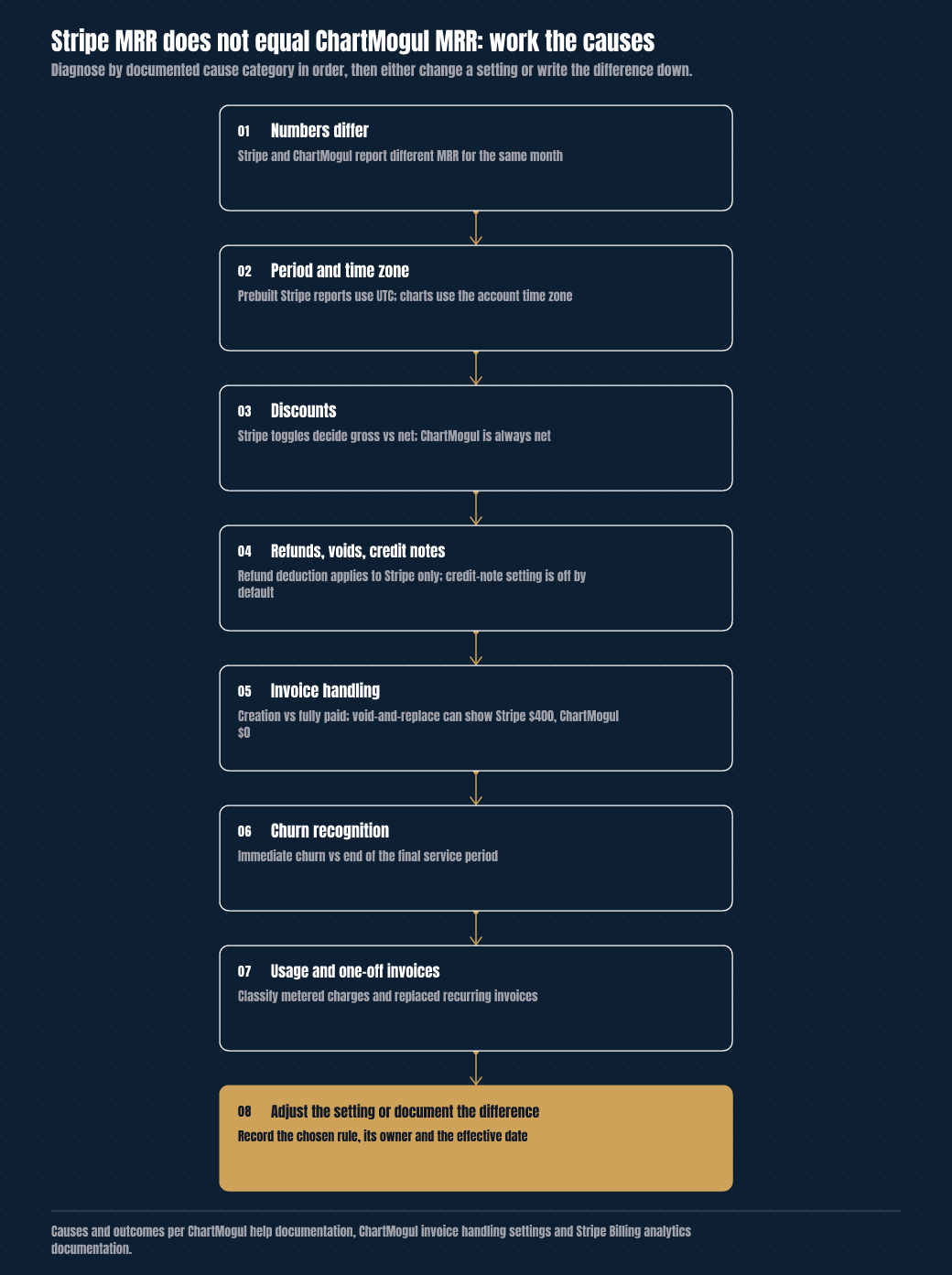
A worked case from the MRRaudit launch shows how invisible this can be. A customer upgrades to a $4,800 annual plan, the auto-generated invoice is voided and replaced with a one-off invoice the customer pays. Stripe still reports $400 MRR from the subscription. ChartMogul sees no recurring invoice and reports $0. Both systems followed their rules.
How to interpret what you find
Every difference falls into one of three buckets. Naming the bucket tells you what to do.
- Setting difference. The rules differ and the data is fine. Decide which rule you want, then change the setting or document the gap.
- Classification difference. The same revenue is labeled recurring in one place and one-off in the other. Usage revenue and replaced invoices live here. Decide the classification and apply it consistently.
- Data difference. A customer is duplicated, missing or mapped to the wrong subscription. Fix the record at the source.
The Stripe-to-ChartMogul reconciliation checklist
Use this as written. It is ungated, and it covers the four areas that explain nearly every gap: customer records, subscriptions, dates and calculation settings.
Customer records
- Export the customer list from both systems and match on customer ID and email.
- Flag customers present in one system only, and customers mapped twice.
- Confirm test or internal accounts are excluded from both.
Subscriptions
- Compare subscription status for every mismatched customer: active, past due, paused, canceled.
- List past-due and paused subscriptions separately. ChartMogul keeps both contributing to MRR; confirm what your Stripe definition does.
- Find replaced or voided invoices where a recurring subscription was swapped for a one-off payment.
- Separate usage-based and metered lines from fixed recurring plans.
Dates
- Confirm the Stripe report type, because prebuilt reports use UTC while charts use the account time zone.
- Confirm the ChartMogul account time zone matches your reporting convention.
- Compare month-end cutoffs, not just month labels.
- Note the date of any recent setting change on either side, and wait out Stripe's 24-48 hour delay.
Calculation settings
- Stripe: record the two discount toggles and the active-subscriber definition.
- ChartMogul: record the MRR recognition setting for new and returning subscribers, the churn recognition setting, the treatment of fully refunded and voided invoices, the credit-note setting and the transaction fee setting.
- Confirm taxes are excluded from both sides.
- Remember ChartMogul normalizes MRR to a 30.45-day month, which can cause small differences for non-monthly plans.
Decision log
- For each cause found, write one line: the rule you chose, the system that follows it, the owner, and the effective date.
Work through the checklist top to bottom and you will have either a closed gap or a short list of documented differences. If you want the rule set carried into your forecasts and board materials, Fiscallion's financial modeling and board reporting service is where that work sits.
What the result means for board reporting and forecasting
"Most gaps are the first two. That is useful news: setting and classification differences can be resolved by a decision, not a data cleanup project."
— Aleksandar Stojanovic, CEO & Founder at FiscallionBen Glass FCCA describes a SaaS client whose dashboard MRR did not match Stripe: refunds were not fully reflected, plan changes were not tracked properly, and some revenue was counted twice. His conclusion matches what we see. Once MRR drifts from its source it becomes an estimate, and estimates feed hiring plans and valuation conversations.
A note on guidance you may have seen elsewhere: "pull MRR from billing, not from a spreadsheet" is still the right starting point. The refinement is that you reconcile to a documented rule set rather than trusting either tool blindly. Billing data is the source. The rule set is what turns it into a number you can defend.
Fiscallion works above the ledger. It does not build dashboards or BI tooling and it is not a bookkeeping firm. The work is settling definitions, ownership and decision rules so the tool you use reports numbers the board can act on. It draws on FP&A leadership experience gained through the growth of a SaaS company to €100M ARR, delivered by a senior partner on every engagement, not a junior delivery team.
"The goal is one number with one owner and a written rule set. A board member should be able to ask how MRR is defined and get an answer that fits on half a page."
— Aleksandar Stojanovic, CEO & Founder at FiscallionIf you are comparing a fractional CFO with a full-time hire or an execution-only FP&A provider, the question is scope. A full-time CFO fits when you need daily executive presence and a permanent finance organization. Fractional CFO support fits when you need senior judgment and model ownership without that headcount.
Common mistakes and replacement moves
| Mistake | Why it fails | Replacement move |
|---|---|---|
| Treating the gap as a sync bug and re-syncing | Rule differences survive a re-sync | Diagnose by cause category before touching the integration |
| Changing ChartMogul settings mid-year | History moves, and board numbers stop being comparable | Change rules at a period boundary and restate with a written note |
| Reporting Stripe gross of discounts to the board | List price overstates what customers pay | Choose net as the default and state it in the definition |
| Treating either tool's MRR as GAAP revenue | MRR is predictable subscription revenue, not income recorded in the books; a $1,200 annual subscription is $100 MRR per month | Label MRR as a management metric and tie revenue to the ledger |
| Leaving exceptions without an owner | Stuck subscriptions stay in MRR long after the customer stops paying | Assign one named owner per reconciliation exception |
Where MRRaudit fits
ChartMogul launched MRRaudit on 2026-10-21 as a free, read-only tool that compares Stripe and ChartMogul MRR and groups differences by cause, such as refunds, discounts, failed payments, usage revenue and subscription status. ChartMogul says it can audit Stripe data without a ChartMogul account.
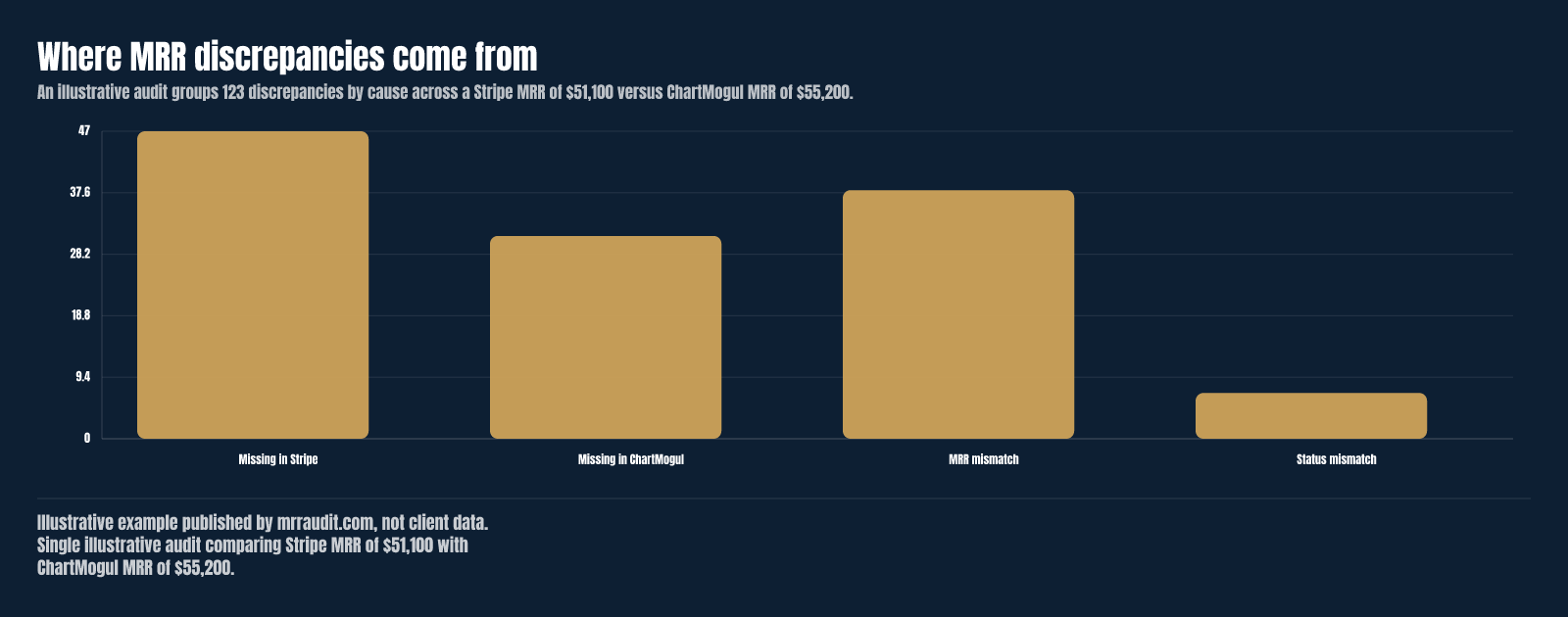
It is one way to automate the checklist above. It does not decide your rule set for you, and it comes from a vendor with a stake in the comparison, so treat its output as a diagnostic input, not a verdict.
FAQ
Why does my Stripe MRR number not match what ChartMogul reports?
Because the two systems apply different rules, not because one is broken. The documented drivers are discounts (ChartMogul is always net, Stripe is configurable), when a new subscription counts (ChartMogul defaults to fully paid invoices), refunds and credit notes, past-due and paused subscriptions, churn timing, time zones and usage revenue. Check discounts first, then work through the rest in order.
How do I reconcile customer and subscription records between Stripe and ChartMogul?
Export both customer lists and match on customer ID and email, then flag customers missing from either side or mapped twice. For each mismatch, compare subscription status and look for voided and replaced invoices, which can leave Stripe at $400 and ChartMogul at $0 for the same customer. Log each cause with the rule you chose and an owner.
Should I trust Stripe or ChartMogul MRR for board reporting and forecasting?
Trust the rule set, not the tool. Billing data is your source, and either tool can produce a defensible number once its discount, invoice-timing, refund and churn settings are chosen and written down. For board reporting, net-of-discount MRR with a documented definition is the safer default, and a senior finance owner should sign off on it before it goes into a forecast.
What settings cause the biggest MRR discrepancies between Stripe and ChartMogul?
Discounts are typically the biggest, since Stripe's two discount toggles decide whether it reports gross or net while ChartMogul reports net. After that, check ChartMogul's invoice recognition setting for new subscribers, its churn recognition setting, the credit-note setting that is off by default, and how fully refunded or voided invoices are handled. Also confirm Stripe's active-subscriber definition.
Decide the rule, then reconcile once
The gap between Stripe and ChartMogul is a governance question. Choose the definition you will report, record the settings that produce it, and name who owns each exception.
Run the checklist this week, before the next board deck forces the question. If the answer needs to flow into forecasts and board materials, that is the work Aleksandar does directly with each client.